
Medium: If You Ask These 4 Python Questions, You Might Still Be a Nooby. https://medium.com/geekculture/if-you-ask-these-4-python-questions-you-might-still-be-a-nooby-7e4c503aa1c3
Category: programming
PyScript: Making Python Scripts Work In Browser For Web App Creation
Search Engine Journal: PyScript: Making Python Scripts Work In Browser For Web App Creation. https://www.searchenginejournal.com/python-scripts-web-app-creation/454348/
4 Automation Projects in Python You Can Finish in a Weekend
Optical Character Recognition using PaddleOCR
Hosting Static Website using FastAPI and Uvicorn
Here is an example program that allows you to host a static website with HTML, CSS and JPEG files using FastAPI and Uvicorn. The example assumes that all the static files are located inside the “site” directory and its sub-directories (e.g. css, images sub-directories etc).
from os.path import isfile
from fastapi import Response
from mimetypes import guess_type
from fastapi.responses import FileResponse
from fastapi import FastAPI

app = FastAPI()

@app.get("/{filename}")
async def get_site(filename):
    filename = './site/' + filename

    if not isfile(filename):
        return Response(status_code=404)
    else:
        return FileResponse(filename)

@app.get("/")
async def get_site_default_filename():
    return await get_site('index.html')
You should be reading academic computer science papers – Stack Overflow Blog
https://stackoverflow.blog/2022/04/07/you-should-be-reading-academic-computer-science-papers/
As working programmers, you need to keep learning all the time. You check out tutorials, documentation, Stack Overflow questions, anything you can find that will help you write code and keep your skills current. But how often do you find yourself digging into academic computer science papers to improve your programming chops?
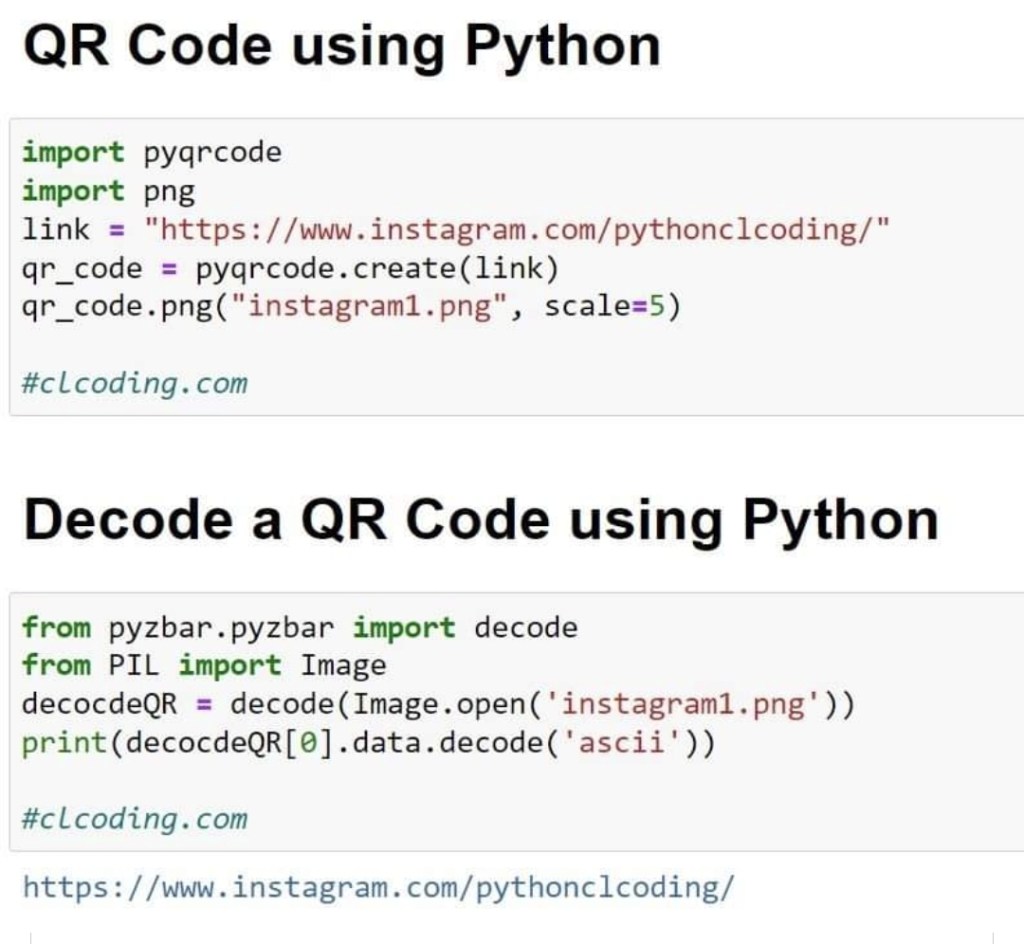
Python Code to Generate and Decode QR Code
Genius Builds Computer Inside Minecraft That Can Run Its Own Games

OOP in Python | OOPs Concepts in Python For Beginners

Quick Guide to nawk
Here is a quick guide to nawk. nawk as it has more functionalities over awk. Most systems now would have both programs installed. See also:
- Quick guide to n8n
- Quick guide to NSCC ASPIRE2A
- Quick guide to Docker
- Quick guide to CVS
- Quick guide to GNUPlot
- Quick guide to Emacs
- Quick guide to Git
To run nawk
- From command line : nawk ‘program’ inputfile1 inputfile2 …
- From a file : nawk -f programfile inputfile1 inputfile2 …
Structure of nawk program
- A nawk program can consist of three sections: nawk ‘BEGIN{…}{… /* BODY */ …}{END}’ inputfile
- Both ‘BEGIN’ and ‘END’ blocks are optional and are executed only once.
- The body is executed for each line in the input file.
Field Separators
- The following example adds the field ‘=’ separator, in addition to the blank space separator: nawk ‘BEGIN{FS = ” *|=”}{print $2}’ input file.
- For example, if the input file contains the line “Total = 500”, then the output will be 500.
Printing Environment Variables
- The following example appends the current path to a list of filenames/directories:
ls -alg | nawk ‘{print ENVIRON[“$PWD”] “/” $8}’ - ENVIRON is an array of environment variables indexed by the individual variable name.
- The variable FILENAME is a string that stores the current name of the file nawk is parsing.
Examples of usage
- To kill all the jobs of the current user : kill -9 `ps -ef | grep $LOGNAME | nawk ‘{print $2}’`
Multi-dimensional array
- To use 2D or multi-dimensional array, use comma to seperate the array index: matrix[3, 5] = $(i+5)
Another examples
- The example below calculates the averages for 16 items from 10 sets of readings.
- Example of an input line the program is trying to match: Total elapsed time is 560
BEGIN{
  printf("--------- Execution Time -----------\n");
  item=16;
  set=10;
}
{# all new variables are initialized to 0for(;j < set;j++)
  for(i=0;i < item; i++)
  {# skip input until the second word matches "elapsed"while($2 != "elapsed")
  getline;# notice the use of array without declaring its# dimensionsum[i]+=$5;
getline;
  }

if(j==set){for(i=0;i < item;i++){

  # this and the next 2 lines are comments
  # you can use either print or printf for output
  # print sum[i]/set;

  printf("Set %d : %6.3f\n",i,sum[i]/set);
}
j++;
  }
}END{
  printf("-------------- End --------------");
}
Examples from the man page
- Write to the standard output all input lines for which field 3 is greater than 5:
$3 > 5 - Write every tenth line:
(NR % 10) == 0 - Write any line with a substring matching the regular expression:
/(G|D)(2[0-9][[:alpha:]]*)/ - Print any line with a substring containing a G or D, followed by a sequence of digits and characters:
/(G|D)([[:digit:][:alpha:]]*)/ - Write any line in which the second field contains a backslash:
$2 ~ /\\/ - Write any line in which the second field contains a backslash (alternate method). Note that backslash escapes are interpreted twice, once in lexical processing of the string and once in processing the regular expression.
$2 ~ “\\\\” - Write the second to the last and the last field in each line, separating the fields by a colon:
{OFS=”:”;print $(NF-1), $NF} - Write lines longer than 72 characters:
{length($0) > 72} - Write the first two fields in opposite order separated by the OFS:
{ print $2, $1 } - Same, with input fields separated by comma or space and tab characters, or both:
BEGIN { FS = “,[\t]*|[\t]+” }{ print $2, $1 } - Add up first column, print sum and average:
{s += $1 }END{print “sum is “, s, ” average is”, s/NR} - Write fields in reverse order, one per line (many lines out for each line in):
{ for (i = NF; i > 0; –i) print $i } - Write all lines between occurrences of the strings “start” and “stop”:
/start/, /stop/ - Write all lines whose first field is different from the previous one:
$1 != prev { print; prev = $1 } - Simulate the echo command:
BEGIN { for (i = 1; i < ARGC; ++i) printf “%s%s”, ARGV[i], i==ARGC-1?”\n”:””} - Write the path prefixes contained in the PATH environment variable, one per line:
BEGIN{n = split (ENVIRON[“PATH”], path, “:”) for (i = 1; i <= n; ++i) print path[i]}
 Techucation
You must be logged in to post a comment.