Mac Studio vs Mac Mini M4: Local AI Performance Benchmarks

Introduction

The rise of local AI has transformed how professionals and enthusiasts interact with large language models. Running AI models locally offers significant advantages: complete data privacy, no recurring subscription costs, offline functionality, and freedom from rate limits. However, the performance of local AI systems varies dramatically depending on hardware choices.

Apple Silicon has emerged as a compelling platform for local AI deployment, leveraging unified memory architecture and efficient neural processing capabilities. But which Apple system delivers the best balance of performance, capability, and value for running local language models?

Motivation

Choosing the right hardware for local AI can be challenging. While cloud-based AI services like ChatGPT and Claude offer convenience, they come with privacy concerns, ongoing costs, and dependency on internet connectivity. Local AI eliminates these issues but requires careful hardware selection to ensure adequate performance.

This comprehensive benchmark comparison aims to answer critical questions:

  • How does the Mac Studio compare to the more affordable Mac Mini M4?
  • What performance trade-offs exist when scaling from tiny (1B) to medium (14B) models?
  • Which configurations provide acceptable interactive performance?
  • Where do Apple Silicon systems stand compared to dedicated GPU solutions?

All benchmarks were conducted using LocalScore AI, a standardized testing platform that measures generation speed, response latency, and prompt processing capabilities across different hardware and model configurations. LocalScore provides consistent, comparable metrics that help users make informed hardware decisions for local AI deployment.

Important Context: While Apple Silicon delivers impressive performance for integrated systems, it’s worth noting that dedicated GPU solutions like the NVIDIA RTX 4090 still significantly outperform these configurations in raw AI inference speed. However, Apple Silicon offers competitive performance within its thermal and power constraints, making it an excellent choice for users prioritizing system integration, energy efficiency, and silent operation over maximum throughput.

Key Takeaway

The Mac Studio dominates local AI performance across all model sizes, delivering 2-10x better speeds than the Mac Mini M4 depending on configuration.

Quick Recommendation: Choose Mac Studio for professional work or if you want to run 8B+ models. Choose Mac Mini M4 only if you’re budget-constrained and committed to tiny (1B) models exclusively.

Complete Performance Results

Both systems were tested with tiny (1B), small (8B), and medium (14B) models using Q4_K medium quantization on November 13, 2025.

MetricMac Studio
(1B)
Mac Mini M4
(1B)
Mac Studio
(8B)
Mac Mini M4
(8B)
Mac Studio
(14B)
Mac Mini M4
(14B)
ModelLlama 3.2 1BLlama 3.2 1BLlama 3.1 8BLlama 3.1 8BQwen2.5 14BQwen2.5 14B
Generation Speed178 tokens/s77.1 tokens/s62.7 tokens/s17.7 tokens/s35.8 tokens/s9.6 tokens/s
Time to First Token203 ms1,180 ms1,060 ms6,850 ms2,040 ms13,300 ms
Prompt Processing5,719 tokens/s1,111 tokens/s1,119 tokens/s186 tokens/s583 tokens/s96 tokens/s
LocalScore Rating1,7134174057821741

Performance Analysis by Model Size

Tiny Model (1B Parameters)

MetricMac StudioMac Mini M4Performance Ratio
Generation Speed178 tokens/s77.1 tokens/s2.3x faster
Time to First Token203 ms1,180 ms5.8x faster
Prompt Processing5,719 tokens/s1,111 tokens/s5.1x faster
LocalScore Rating1,7134174.1x higher

Mac Studio: Delivers exceptional performance with near-instantaneous 203ms response time and high throughput. Excellent for real-time coding assistance, content creation, and interactive workflows.

Mac Mini M4: Provides functional performance with noticeable 1.18-second latency. Adequate for occasional use and non-critical applications.

Small Model (8B Parameters)

MetricMac StudioMac Mini M4Performance Ratio
Generation Speed62.7 tokens/s17.7 tokens/s3.5x faster
Time to First Token1,060 ms6,850 ms6.5x faster
Prompt Processing1,119 tokens/s186 tokens/s6.0x faster
LocalScore Rating405785.2x higher

Mac Studio: Maintains functional performance with 1.06-second response time. Suitable for quality-focused applications where enhanced model capabilities justify slower speeds.

Mac Mini M4: Experiences severe degradation with 6.85-second latency. The slow response time makes interactive use impractical for most workflows.

Medium Model (14B Parameters)

MetricMac StudioMac Mini M4Performance Ratio
Generation Speed35.8 tokens/s9.6 tokens/s3.7x faster
Time to First Token2,040 ms13,300 ms6.5x faster
Prompt Processing583 tokens/s96 tokens/s6.1x faster
LocalScore Rating217415.3x higher

Mac Studio: Shows significant slowdown with 2.04-second response time. Best suited for batch-oriented workflows where maximum model capability is prioritized over speed.

Mac Mini M4: Performance becomes severely constrained with 13.3-second latency (over 13 seconds before first response). Generation at only 9.6 tokens/s makes this configuration unusable for interactive applications.

Model Scaling Performance

Mac Studio Scaling

Model SizeGenerationFirst TokenPrompt ProcessingScore
1B (Tiny)178 tokens/s203 ms5,719 tokens/s1,713
8B (Small)62.7 tokens/s1,060 ms1,119 tokens/s405
14B (Medium)35.8 tokens/s2,040 ms583 tokens/s217

The Mac Studio shows progressive performance degradation as model size increases, but maintains usable performance across all tested sizes. The 8x increase from 1B to 8B parameters results in 65% slower generation, while the 14B model runs at approximately half the speed of the 8B model.

Mac Mini M4 Scaling

Model SizeGenerationFirst TokenPrompt ProcessingScore
1B (Tiny)77.1 tokens/s1,180 ms1,111 tokens/s417
8B (Small)17.7 tokens/s6,850 ms186 tokens/s78
14B (Medium)9.6 tokens/s13,300 ms96 tokens/s41

The Mac Mini M4 experiences catastrophic performance degradation with larger models. Moving from 1B to 8B results in 77% slower generation, and the 14B model suffers an additional 46% reduction. The 13.3-second time to first token with the 14B model represents a nearly unusable configuration for any interactive application.

Configuration Recommendations

ConfigurationPerformance SummaryBest ForRecommendation
Mac Studio + 1B178 tokens/s, 203ms latencyReal-time coding, content creation, maximum performanceExcellent – Recommended for professional use
Mac Studio + 8B62.7 tokens/s, 1.06s latencyEnhanced reasoning, quality over speedGood – Balanced performance and capability
Mac Studio + 14B35.8 tokens/s, 2.04s latencyMaximum capability, batch workflowsFair – For users prioritizing model sophistication
Mac Mini M4 + 1B77.1 tokens/s, 1.18s latencyBudget-conscious, occasional useFair – Acceptable for casual users
Mac Mini M4 + 8B17.7 tokens/s, 6.85s latencyNot recommended for interactive usePoor – Too slow for most applications
Mac Mini M4 + 14B9.6 tokens/s, 13.3s latencyNot recommended for any practical usePoor – Unusable for interactive applications

Bottom Line

The Mac Studio demonstrates clear superiority across all tested configurations, with performance advantages ranging from 2-6x for tiny models up to 10x for larger models. The system handles tiny models exceptionally well, small models competently, and medium models adequately for users prioritizing capability over speed.

The Mac Mini M4 is only viable for tiny (1B) models, where it provides functional if slower performance. Small (8B) and medium (14B) models push the hardware well beyond practical limits, with response latencies of 6.85 and 13.3 seconds respectively making interactive use frustrating or impossible.

Hardware choice significantly impacts local AI usability. Users should match their investment to their model size requirements: Mac Studio for flexibility across all model sizes, Mac Mini M4 only if committed to tiny models exclusively.

Performance Context: Apple Silicon vs Dedicated GPUs

While these benchmarks demonstrate the Mac Studio’s leadership among Apple Silicon options, it’s important to maintain realistic expectations. Dedicated GPU solutions, particularly the NVIDIA RTX 4090, deliver significantly higher raw performance—often 3-5x faster than the Mac Studio for similar model sizes. Systems built around high-end GPUs can achieve 400+ tokens/s with small models and maintain better performance scaling with larger models.

However, Apple Silicon offers distinct advantages that make it compelling despite lower absolute performance:

  • System Integration: All-in-one design without external GPU requirements
  • Energy Efficiency: Lower power consumption and heat generation
  • Silent Operation: Minimal fan noise compared to high-performance GPUs
  • Unified Memory: Efficient memory sharing between CPU and neural processing
  • macOS Ecosystem: Seamless integration with macOS applications and workflows

The choice between Apple Silicon and dedicated GPU solutions depends on priorities. Users requiring maximum raw performance should consider GPU-based systems. Those valuing system integration, energy efficiency, noise levels, and macOS compatibility will find Apple Silicon delivers excellent local AI capabilities within its design constraints.

For more benchmark comparisons across different hardware configurations, visit LocalScore AI.

Benchmark Sources

HardwareModelParametersTest Link
Mac StudioLlama 3.2 1B1B (Tiny)Test #1788
Mac Mini M4Llama 3.2 1B1B (Tiny)Test #1789
Mac StudioLlama 3.1 8B8B (Small)Test #1790
Mac Mini M4Llama 3.1 8B8B (Small)Test #1791
Mac StudioQwen2.5 14B14B (Medium)Test #1792
Mac Mini M4Qwen2.5 14B14B (Medium)Test #1793

All tests conducted November 13, 2025, using LocalScore AI with Q4_K Medium quantization.

Streamlining macOS Application Management with Homebrew Cask

macOS users frequently face the challenge of efficiently managing application installations across multiple machines. The traditional approach involves manually downloading disk images, navigating installation wizards, and maintaining applications across systems. Homebrew Cask offers a command-line solution that significantly streamlines this process.

Understanding Homebrew Cask

Homebrew Cask is an extension of Homebrew, the widely-adopted package manager for macOS. While Homebrew manages command-line tools and libraries, Cask extends this functionality to graphical user interface (GUI) applications. This enables system administrators, developers, and power users to install, update, and manage standard macOS applications through terminal commands.

The conventional installation workflow requires multiple steps:

  1. Locating the official download source
  2. Downloading the disk image file
  3. Opening and mounting the disk image
  4. Transferring the application to the Applications folder
  5. Ejecting the disk image
  6. Managing the downloaded installer file
  7. Repeating this process for each required application

Homebrew Cask reduces this to a single command:

brew install --cask google-chrome

The application is then installed automatically with no further user interaction required.

Key Advantages for Professional Workflows

1. Accelerated System Provisioning

Organizations and individual users can maintain installation scripts containing all required applications. A typical enterprise development environment setup might include:

brew install --cask visual-studio-code
brew install --cask docker
brew install --cask slack
brew install --cask zoom
brew install --cask rectangle
brew install --cask iterm2
brew install --cask spotify
brew install --cask vlc

This approach reduces new machine setup time from several hours to approximately 15-20 minutes, depending on network bandwidth and the number of applications being installed.

2. Simplified Update Management

Maintaining current software versions is essential for security compliance and feature availability. Rather than monitoring and updating each application individually, administrators can execute a single command:

brew upgrade --cask

This command updates all Cask-managed applications to their latest versions, ensuring consistent patch management across the system.

3. Complete Application Removal

Standard macOS uninstallation methods often leave residual files including configuration data, cache files, and preference files distributed throughout the file system. Homebrew Cask performs thorough removal:

brew uninstall --cask docker

This ensures complete application removal without orphaned system files.

4. Automation and Standardization

Homebrew Cask’s command-line interface enables scripting and automation. Development teams can create standardized setup scripts ensuring consistent development environments. IT departments can implement automated workstation provisioning workflows. System configurations can be version-controlled in dotfiles repositories, enabling rapid deployment and rollback capabilities.

Recommended Applications by Category

The following applications represent commonly deployed tools across professional environments:

Development Tools

brew install --cask visual-studio-code
brew install --cask iterm2
brew install --cask docker
brew install --cask postman
brew install --cask dbeaver-community

Productivity Applications

brew install --cask rectangle        # Window management
brew install --cask alfred           # Enhanced search functionality
brew install --cask obsidian         # Knowledge management
brew install --cask notion           # Collaborative workspace

Communication Platforms

brew install --cask slack
brew install --cask zoom
brew install --cask discord

System Utilities

brew install --cask the-unarchiver
brew install --cask appcleaner
brew install --cask vlc

Implementation Guide

Organizations and users without an existing Homebrew installation can deploy it with a single command:

/bin/bash -c "$(curl -fsSL https://raw.githubusercontent.com/Homebrew/install/HEAD/install.sh)"

Once Homebrew is installed, Cask functionality is built right in. Just start using brew install --cask commands.

Useful Commands to Know

# Search for an app
brew search --cask chrome

# Get information about an app
brew info --cask visual-studio-code

# List all installed cask apps
brew list --cask

# Update all apps
brew upgrade --cask

# Uninstall an app
brew uninstall --cask slack

A Few Gotchas

Cask isn’t perfect. Here are some things to be aware of:

  • Not every app is available – Popular apps are well-covered, but niche or very new applications might not be in the repository yet
  • App Store apps aren’t included – Apps distributed exclusively through the Mac App Store can’t be installed via Cask
  • Some apps require manual steps – Occasionally, an app needs additional configuration or permissions that Cask can’t automate
  • Updates might lag slightly – Cask maintainers need to update formulas when new versions release, so there can be a brief delay

These are minor inconveniences compared to the time saved.

The Bottom Line

Homebrew Cask has fundamentally changed how I interact with my Mac. What started as a way to avoid repetitive downloads has become an essential part of my workflow. The ability to script, automate, and version-control my application setup means I’m never more than a few commands away from a productive environment.

If you spend any significant time on macOS, especially as a developer or power user, Homebrew Cask is worth learning. Your future self—the one setting up that next new machine—will thank you.

Try It Yourself

Pick three applications you use regularly and install them via Cask. I bet you’ll be hooked by the simplicity. Start with something like:

brew install --cask visual-studio-code
brew install --cask google-chrome  
brew install --cask rectangle

Welcome to a more efficient way of managing your Mac applications.


What’s your favorite Homebrew Cask application? Have you automated your Mac setup? Share your experiences in the comments below!

AI is displacing software engineers, but those in Singapore have the chance to fare better

https://www.straitstimes.com/business/ai-is-displacing-software-engineers-but-those-in-singapore-have-the-chance-to-fare-better?sfnsn=mo

Exploring Quantum Entanglement: CHSH Game Simulator

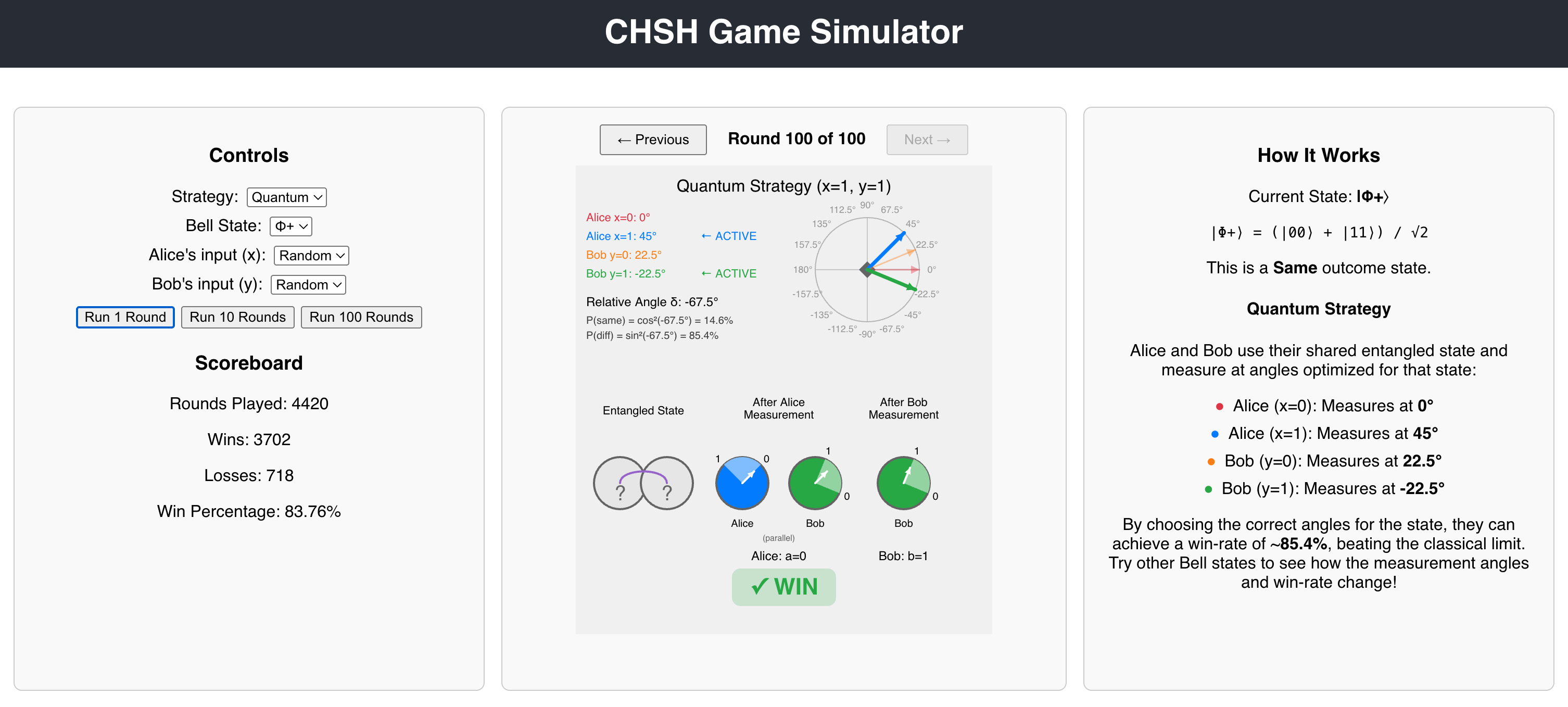
Have you ever wondered how quantum mechanics and quantum computing defies our everyday intuition? Below is a project I built that demonstrates one of the most mind-bending phenomena in quantum physics: quantum entanglement and its ability to violate classical physics constraints.

Live Demo

🎮 Try the CHSH Game Simulator

📂 View on GitHub

What is the CHSH Game?

The CHSH (Clauser-Horne-Shimony-Holt) game is a fascinating thought experiment that reveals the strange power of quantum entanglement. It’s a cooperative game between two players, Alice and Bob, who cannot communicate with each other but share a special resource.

The Game Rules

  1. A referee sends random bits x and y to Alice and Bob respectively
  2. Alice outputs a bit a based on her input x
  3. Bob outputs a bit b based on his input y
  4. They win if: (a + b) mod 2 = x × y

The fascinating part? With classical strategies (no quantum physics), the maximum win rate is 75%. But with quantum entanglement, Alice and Bob can achieve approximately 85.4% – seemingly breaking the laws of classical physics!

Key Features

🎯 Interactive Visualization

The app features a real-time p5.js visualization that shows:

  • Entangled State: Two qubits in a maximally entangled Bell state
  • After Alice’s Measurement: How Alice’s measurement affects both qubits
  • After Bob’s Measurement: The final collapsed state after both measurements

Each stage includes:

  • Colored measurement basis quadrants (red, blue, orange, green)
  • Clear labels showing measurement outcomes (0 and 1)
  • Visual indication of quantum correlation (parallel or orthogonal)

🧪 Four Bell States

The simulator supports all four maximally entangled Bell states:

  1. |Φ+⟩ = (|00⟩ + |11⟩)/√2
  2. |Φ-⟩ = (|00⟩ – |11⟩)/√2
  3. |Ψ+⟩ = (|01⟩ + |10⟩)/√2
  4. |Ψ-⟩ = (|01⟩ – |10⟩)/√2

Each Bell state uses carefully optimized measurement angles to maximize the CHSH violation and achieve the theoretical ~85% win rate.

🎮 Strategy Comparison

Switch between:

  • Classical Strategy: Always outputs 0, achieving the theoretical 75% maximum
  • Quantum Strategy: Uses entangled qubits to beat classical limits

🎲 Flexible Input Controls

Choose input bits for Alice (x) and Bob (y):

  • Random: Simulates realistic random inputs
  • Fixed (0 or 1): Test specific measurement configurations

📊 Real-Time Statistics

Track performance with:

  • Total rounds played
  • Wins and losses
  • Win percentage that converges to theoretical predictions

🔄 Round History Navigation

Navigate through previous rounds to review specific outcomes and understand the quantum measurement process better.

The Science Behind It

Bell’s Inequality and CHSH

In 1964, physicist John Bell proved that no local hidden variable theory could reproduce all predictions of quantum mechanics. The CHSH inequality is a specific formulation of Bell’s theorem:

Classical limit: S ≤ 2

Quantum mechanics: S = 2√2 ≈ 2.828

This violation proves that quantum entanglement exhibits correlations that cannot be explained by any classical mechanism, even with shared randomness!

Measurement Angles

The key to achieving the quantum advantage lies in choosing the right measurement angles. For the standard |Φ+⟩ Bell state:

  • Alice’s bases: 0° (x=0), 45° (x=1)
  • Bob’s bases: 22.5° (y=0), -22.5° (y=1)

The probability that Alice and Bob get the same outcome is:

P(same) = cos²(δ)

where δ is the relative angle between their measurement bases. This quantum correlation is what allows them to beat the 75% classical limit.

Orthogonal vs Parallel Correlation

Different Bell states exhibit different correlation patterns:

  • Parallel correlation (|Φ+⟩, |Ψ+⟩): Qubits tend to give the same measurement outcome
  • Orthogonal correlation (|Φ-⟩, |Ψ-⟩): One qubit is rotated 90° relative to the other

The simulator accounts for these differences and adjusts the probability calculations accordingly.

Try It Yourself!

You can try the simulator and explore:

  1. Start with the Classical strategy and run 100 rounds – you’ll see it converge to ~75%
  2. Switch to Quantum with the |Φ+⟩ Bell state – watch it reach ~85%
  3. Try different Bell states and input combinations
  4. Use the round navigation to review specific outcomes

Future Enhancements

  • 3D Bloch Sphere Visualization: Show quantum states on the Bloch sphere using Three.js
  • Animated Transitions: Step-by-step animation of the measurement process
  • Educational Tutorial: Guided walkthrough explaining each concept
  • Mathematical Deep Dive: Optional panel with detailed probability calculations
  • Mobile Optimization: Touch-friendly controls and responsive layout

Open Source

The complete source code is available on GitHub. Feel free to:

  • Explore the code
  • Report issues
  • Suggest improvements
  • Fork and build your own quantum visualizations!

Conclusion

The CHSH game beautifully demonstrates that quantum entanglement isn’t just mathematical abstraction – it has measurable, observable consequences that defy classical intuition. This simulator makes that phenomenon interactive and accessible.

Whether you’re a physics student, educator, or simply curious about quantum mechanics, I hope this tool helps you develop an intuition for one of nature’s most fascinating phenomena.


Built with: React, p5.js, and Claude Code

Try it now: https://myhlow.github.io/chsh-game-simulator

Source code: https://github.com/myhlow/chsh-game-simulator


Have questions or suggestions? Leave a comment below or open an issue on GitHub!

The CEO Magazine: David Ellis: Why AI makes new graduates more valuable than ever

https://amp.theceomagazine.com/business/innovation-technology/david-ellis/

Ellis sees a different future. Rather than eliminating graduate positions, IBM Consulting is actively increasing them.

“So, for example, we are increasing, not decreasing, the number of graduate hires that we’re making here in Australia,” he says.

Investing in the future
The reasoning is both strategic and generational. Today’s graduates enter the workforce with a crucial advantage – they’ve been using AI longer than most experienced workers.

“We have people entering the workforce that have perhaps been using AI longer than many others. Maybe they’ve been using it through their studies. Maybe they’ve just got a deeper affinity to it,” Ellis explains.

When properly equipped and trained, these AI-native workers can be a huge asset to organizations.

“We can skill them, we can equip them, we can give them the confidence to be much more effective than you or I might have been at the beginning of our careers,” he says.

Microsoft shows off its latest Analog Optical Computer • The Register

https://www.theregister.com/2025/09/05/microsoft_analog_optical_computer/

The Analog Optical Computer (AOC) harnesses light as a medium for solving complex problems, notably optimization challenges found in the worlds of logistics, finance, and healthcare. It uses different light intensities to perform operations such as addition and multiplication. It’s also considerably faster at certain problem-solving activities than traditional computers.

There may soon be a new approach to treat hard-to-control high blood pressure | CNN

https://www.cnn.com/2025/08/30/health/blood-pressure-medicine-baxdrostat

The researchers on the new trial placed the participants into three groups. One received 1 milligram of baxdrostat, another got 2 mg, and another got a placebo, which does nothing. Participants took their dose in addition to medicines they were already taking.

At 12 weeks, about 4 in 10 patients taking baxdrostat reached healthy blood pressure levels, compared with less than 2 in 10 who got a placebo.

Specifically, participants who got 1 or 2 mg of baxdrostat daily saw their systolic blood pressure – the upper number in the reading – fall around 9 to 10 mm Hg more than those taking a placebo. This reduction, studies show, is large enough to cut cardiovascular risk.