I saw this on Slashdot and thought you should see it:
Linus Torvalds Reflects On How He’s Been Hostile To Linux Community Members Over the Years, Issues Apology. – http://www.slashdot.org/story/345956

I saw this on Slashdot and thought you should see it:
Linus Torvalds Reflects On How He’s Been Hostile To Linux Community Members Over the Years, Issues Apology. – http://www.slashdot.org/story/345956
Here is a quick guide to using Docker. See also:
From: https://docs.docker.com/docker-for-windows/#docker-settings-dialog
Printing the version
docker --versionTesting the installation
docker run hello-worldListing the images
docker image lsListing all the containers
docker container ls --allOther help
> docker --help
> docker container --help
> docker container ls --help
> docker run --help
Pull an image of the Ubuntu OS and run an interactive terminal inside the spawned container:
docker run --interactive --tty ubuntu bashPull and run a Dockerized nginx web server that we name, webserver:
docker run --detach --publish 80:80 --name webserver nginxYou can now point your browser to http://localhost and see that the nginx welcome page is loaded.
List only your running containers:
docker container lsStop the running nginx container by the name we assigned it, webserver:
docker container stop webserverStart a container that was stopped/exited previously:
docker start webserverAttached to a running container, webserver:
docker attach webserverExit from an interactive session of a container, webserver without stopping it:
Press CTRL-P followed by CTRL-QRemove all containers by its name:
docker container rm webserver The following common starts an interactive ash command line session for the docker image alpine-npm, maps the internal port 3000 to the host port 3000, set the number of cpus allocated to 10, gives it a name “react”, and automatically removes the image upon exit:
docker run -p 3000:3000 -cpus 10 -it --name react --rm alpine-npm /bin/ash
See the following page on how to display applications onto your Windows 10.
https://dev.to/darksmile92/run-gui-app-in-linux-docker-container-on-windows-host-4kde
Since April, according to the company, npm users have run 50 million automatic scans and have deliberately invoked the command 3.1 million times. And they’re running 3.4 million security audits a week. Across all audits, 51 per cent found at least one vulnerability and 11 per cent identified a critical vulnerability. In a phone interview with The Register, Adam Baldwin, head of security at NPM, said he didn’t have data on how many people are choosing to fix flagged flaws. “But what we’ve seen from pull requests suggests it’s gaining traction,” he said.
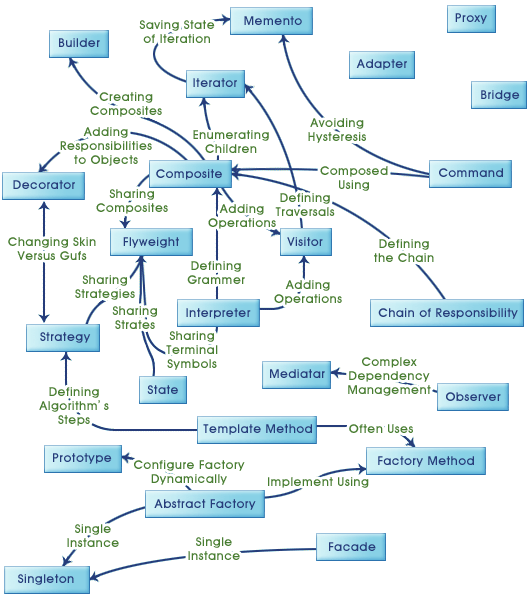
Design Pattern Relationship
The Department of Homeland Security is now using the data to track foreigners overstaying their visas, according to the Times. “After passengers’ faces are scanned at the gate, the scan is sent to Customs and Border Protection and linked with other personally identifying data, such as date of birth and passport and flight information.”
But the face scans are collected by independent companies, and Border Protection officials insist they have no control over how that data gets used.
Baltimore Police Department Is Still Using Lotus Notes – http://www.slashdot.org/story/344446
WhatsApp Flaw Could Allow Hackers To Modify, Send Fake Messages – http://www.slashdot.org/story/344404
Children Learn Best When Their Bodies Are Engaged in the Living World. We Must Resist the Ideology of Screen-Based Learning – http://www.slashdot.org/story/344278
Do Businesses Really Need to Hire CS Majors? – http://www.slashdot.org/story/344232
‘The Problem With Programming and How To Fix It’ – http://www.slashdot.org/story/344234

 Techucation
You must be logged in to post a comment.